CleanTheBank
First-session route

Clean The Bank Beginner Guide - First Session Walkthrough

To get started in Clean The Bank!, use E (or Click) on PC or RT on controller to pick up misplaced bank valuables from the lobby floor. Press R (or RS) to inspect the object shape, then match it to the green glowing 3D silhouettes on storage racks in observed rooms such as Copper Vault, Gold Vault, Gems, or Trophy rooms. Keep your starter inventory clear and check the Upgrades menu (Y on controller) as you accumulate Cash.

Onboarding order

Follow the first-session route

  1. Learn the interaction inputs

    Master pickup and placement before rushing into vault corridors. Press E or Left Click on PC (RT on controller) to collect an object from the floor or counters. If you pick up an incorrect item, press F (LT on controller) to drop it immediately.

  2. Inspect object silhouettes with R or RS

    Press R on PC or click RS on controller to inspect what you are holding. Look closely at the shape and material—such as rectangular metal bars or gem clusters—to avoid walking into the wrong vault room.

  3. Clear the bank lobby floor first

    Start by picking up items scattered across the main Global Union Bank lobby before diving into deeper corridors. This establishes an open workspace and builds your initial Cash balance.

  4. Deposit into green glowing silhouettes

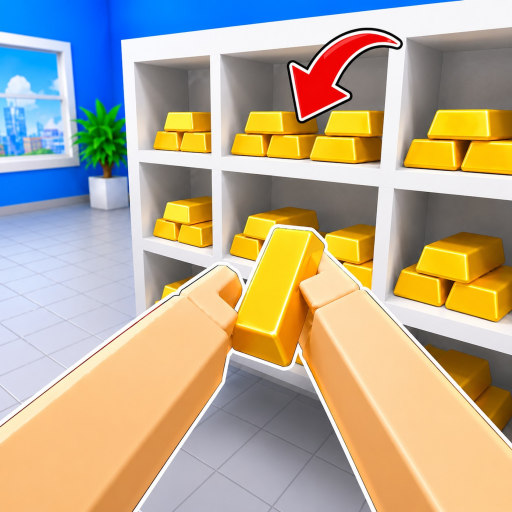
    Carry matching items to storage shelves and approach the green glowing 3D silhouette outline. Press E / Click (or RT) to seat the item into the designated slot on the rack.

  5. Check the Upgrades menu (Y key)

    Open the in-game Upgrades interface using the Y button on controller or the screen icon to review observed inventory capacity states as you earn Cash from completed placements.

Core lessons

Understand these systems first

Understanding the Core Pickup and Placement Loop

Clean The Bank! revolves around clearing Global Union Bank of thousands of scattered objects. In sampled August 2026 footage, HUD counters showed totals such as 1,790 items, though live counts can vary across servers. Success depends on efficiently gathering objects with E/Click (RT), verifying their shapes with R (RS), and placing them onto matching rack silhouettes.

Navigating Observed Vault Zones

Valuables are organized into dedicated themed storage areas. Sampled gameplay footage highlights four primary labeled zones: Copper Vault, Gold Vault, Gems, and Trophy room. Carrying an item to an incompatible rack will not register, so identify the room theme before transporting items across the facility.

Managing Inventory and Carried Slots

Players begin with limited carrying capacity—observed in starter gameplay frames as 0/1 or 1/1 before upgrading to 3/3 or higher. Use number keys 1-9 on PC to cycle between slots when holding multiple objects, and drop mismatched clutter with F (LT) rather than hauling it through wrong zones.
If stuck

First-session roadblocks

Item not placing on rack

Ensure the green glowing 3D silhouette exactly matches the shape of your carried object. If the shelf outline is a different size or material, you are likely in the wrong vault zone or looking at a different item slot.

Inventory full and cannot pick up

Check your carried inventory indicator. If full, use number keys 1-9 (or controller controls) to select an item and deposit it, or press F (LT on controller) to drop items you cannot immediately place.

Lost in Global Union Bank corridors

Return to the central lobby area to reorient yourself. The main lobby acts as the central transit hub connecting to the observed Copper, Gold, Gems, and Trophy vaults.

Avoid

Beginner mistakes

Hoarding unsorted items without depositing

Filling your limited starter inventory with random objects from different rooms slows down movement and clutters your slots. Focus on clearing one item type or room cluster at a time.

Ignoring the R/RS Inspect control

Guessing placement solely by room color often leads to wasted travel. Always inspect the item geometry first to confirm whether it belongs in Copper, Gold, Gems, or Trophy storage.

Looking for external code rewards early

While the Roblox description promises a code milestone at 1,000 Likes, no verified codes have been released by NightSync Studio as of October 1, 2026. Progression comes strictly from cleaning gameplay.

Controls & Keybindings

Complete official PC and controller keybindings including G and Y functions.

Vaults & Items Guide

Observed vault rooms, door labels, and item silhouette placement cues.

Codes Status Tracker

Current verification status for the official 1,000 Likes milestone code.