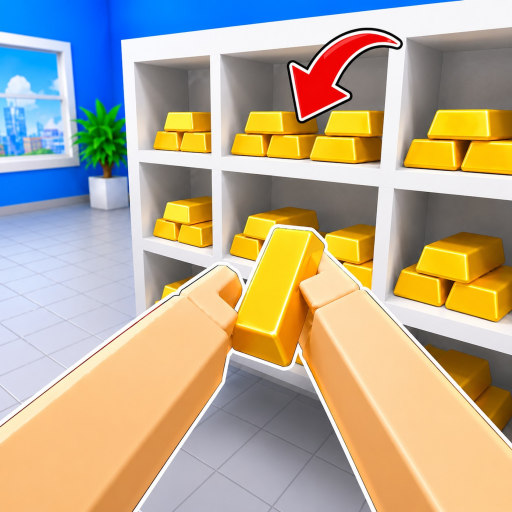
Observed Examples GuideA player lookup guide reviewing observed vault room labels, sample item frames, and green shelf silhouettes in Clean The Bank! on Roblox.
First-Screen Quick Answerchecked August 2026
Quick Answer: Observed Vault Labels & Sample Items
In sampled gameplay footage of Clean The Bank!, room signage was observed for Copper Vault, Gold Vault, Gems, and Trophy. Storage shelves with green shelf silhouettes were visible in limited frames. Sampled items recorded include Gold Bar (seen in Gold Vault frames), Platinum Bar (seen near green shelf shapes), and Gold Diamond (seen near a green shelf shape with no room assignment).
Official controls label E / Click or RT as Pickup/Place, F / LT as Drop, and R / RS as Inspect. The visual display, camera behavior, and interface details of Inspect are undocumented.
Scope & Evidence Disclosure: This page is strictly an observed-example guide (1,790 version-observed items in August 2026 keyframes). Unlisted items, destinations, rewards, and unlock rules are not covered.
Fast Player LookupDirect lookup connecting observed item labels, room signage, visual cues, certainty level, and recommended player action.
| Room / Location | Observed Item | Visual Cue / Silhouette | Certainty | Player Action |
|---|
| Gold Vault | Gold Bar | Green shelf silhouette | Observed in Gold Vault Frames | Observed in Gold Vault frames near green shelf silhouettes; use Pickup/Place (E / RT) when a directly matching green shelf silhouette is visible. |
| Unassigned Room | Platinum Bar | Green shelf shape | Observed Frame (Room Unassigned) | Room unassigned in sampled frames; inspect with R / RS and match directly visible green shelf shape without assuming a specific room. |
| Unassigned Room | Gold Diamond | Green shelf shape | Observed Frame (Room Unassigned) | Room unassigned in sampled frames; inspect with R / RS and match directly visible green shelf shape without assuming a specific room. |
| Any Bank Room / Unknown | Unlisted Bank Item | Green object silhouette or shelf slot | Unlisted in Sampled Frames | Pick up with E / RT, inspect with R / RS, check labeled room doors (Copper, Gold, Gems, Trophy), and match visible object outline without guessing a room. |
No-Match Recovery: If carrying an item not listed above, do not guess a placement. Check the room entrance signage (Copper Vault, Gold Vault, Gems, Trophy), inspect the item with R / RS, and look for a matching green silhouette on nearby shelving.
Bank Layout SignageRoom signage and door labels identified in sampled gameplay footage.
Gold Vault
Observed LabelSampled video footage showed signage for Gold Vault. In sampled frames, Gold Bar was seen in Gold Vault frames near green shelf silhouettes. Door unlock conditions, Cash rewards, and unlisted item destinations are not covered.
Copper Vault
Observed LabelSampled video footage showed door signage for Copper Vault with green shelf silhouettes visible in limited frames. Specific item lists, clearing mechanics, and unlock rules are not covered.
Gems
Observed SignageIdentified by observed “Gems” door signage in gameplay video keyframes. Associated item catalogs, entry requirements, and room destinations are not covered.
Trophy
Observed SignageIdentified by observed “Trophy” door signage in gameplay video keyframes. Object lists, unlock requirements, and reward rules are not covered.
Observed Controls & VisualsDocumented control mappings and visual frames from gameplay footage.
Official in-game control schemes provide specific action labels for keyboard, mouse, and gamepad inputs. Visual shelf cues have been documented across sampled gameplay recordings.
Pickup / Place Control
Official controls label E / Click (PC) and RT (Controller) as Pickup/Place. Universal placement behavior beyond this label is undocumented.
Drop Control
Official controls label F (PC) and LT (Controller) as Drop. Drop mechanics beyond this official control label are undocumented.
Inspect Control
Official controls label R (PC) and RS (Controller) as Inspect. The display and details of Inspect are undocumented.
Observed SystemsHUD capacity states and slot selection keys documented in gameplay.
Observed HUD Carrying Capacities
Gameplay HUD recordings show starter inventory capacity at 0/1 or 1/1, with expanded capacities such as 0/3 and 3/3 observed during play. An Upgrades menu exists in-game (accessible via HUD button or Controller Y), but exact purchase costs, capacity tiers, and progression requirements are not covered.
Carried Slot Selection
When carrying multiple items, players can use the 1-9 number keys on PC to select an active inventory slot. Route efficiencies, carrying orders, and speed impacts are not covered.
Server ContextPlatform metadata and developer competition details.
20-Player Servers
Roblox platform metadata lists a maximum server size of 20 players per instance. Players can explore the bank environment together or solo.
Environment Layout
Footage shows a central bank lobby connecting to corridors and labeled rooms. Room routing and item distribution patterns are not covered.
Competition Mention
NightSync Studio officially lists a fastest-time competition in game descriptions. Leaderboard scoring and reset rules are not covered.
Observation MethodologyA four-point protocol for recording verifiable frame observations without predicting mechanics.
Because this page serves as an observed-example guide rather than a speculative full catalog, player notes and screenshots should be recorded using this structured field-note checklist. Unlisted items, destinations, rewards, and unlock rules are not covered.
Record Visible Item Label
1Note the exact on-screen item name tag visible in the frame (such as Gold Bar, Platinum Bar, or Gold Diamond). Record the label exactly as displayed without predicting unlisted item mechanics or assuming item categories.
Record Visible Room Label
2Document the exact room signage or door label shown in the footage (such as Copper Vault, Gold Vault, Gems, or Trophy). If no room label appears in the frame, mark it as unassigned rather than guessing a destination.
Log Screenshot Timestamp
3Log the exact video timestamp or capture time for the frame. Keeping an exact timestamp allows cross-checking against recorded gameplay footage without asserting unverified rules.
Verify Target Game Context
4Confirm that the sampled frame is from Clean The Bank! on Roblox rather than an unrelated bank heist or cleaning title. Do not predict mechanics, drop behaviors, or progression systems.
Field-Note Boundary Notice: Always record the visible item label, visible room label, screenshot timestamp, and whether the frame is from the target game. Do not predict unlisted mechanics, assume universal placement rules, or estimate cash payouts. Unlisted items, destinations, rewards, and unlock rules are not covered.
Observed Evidence & Status Boundary
Clean The Bank! contains thousands of scattered objects (with a version-observed total of 1,790 items recorded in August 2026 keyframes). This guide covers only observed room labels (Copper Vault, Gold Vault, Gems, Trophy), green shelf silhouettes in limited frames, and sample items (Gold Bar, Platinum Bar, Gold Diamond). Room unlock rules, cash reward amounts, counter update causality, and unlisted items/destinations are not covered.