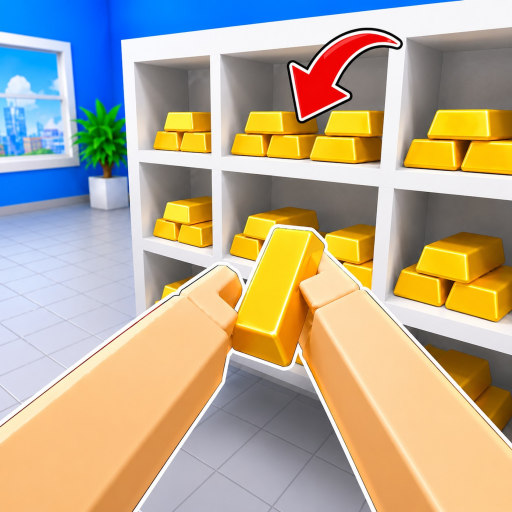
Clean The Bank! Gameplay Guides
Master the official controls, beginner cleanup sequences, and observed vault item placement rules for Clean The Bank! on Roblox.
Quick Answer: How to Progress in Clean The Bank!
To get started in Clean The Bank!, begin by learning the official input mappings: use E / Click (or RT) to pick up objects, inspect them with R (or RS) to check their shape, and match them to green glowing 3D silhouettes on storage racks in observed themed areas (such as Copper Vault, Gold Vault, Gems, and Trophy rooms). Players can also open the in-game Upgrades menu (Y key on controller or HUD button) to view capacity options.
Explore Our Dedicated Guides
Choose the guide that matches your current gameplay need.
Controls & Basics
Learn official PC and controller inputs, the basic pickup loop, inventory capacity, and Cash upgrades.
Vaults & Items
Explore observed vault sections including Copper, Gold, Gems, and Trophy rooms with placement examples.
Beginner Guide
Follow a step-by-step first-session walkthrough from basic pickup controls to clearing the lobby and placing items.
Farming Guide
Optimize Cash farming and sorting runs with zone-based clearing loops and inventory capacity upgrades.
Progression Guide
Advance checkpoint by checkpoint from initial solo sorting to multi-slot inventory states and leaderboard speedruns.
The 5-Step Bank Sorting Loop
Follow this systematic sequence to pick up, inspect, and match items using interface cues.
Pickup
Press E / Click or RT to gather misplaced objects from floors and desks.
Inspect
Press R or RS to inspect the object and identify its shape and material.
Switch Slot
Use number keys 1-9 on PC to switch between held items when multiple slots are available.
Match Cue
Navigate to observed storage zones and find matching green glowing 3D silhouettes on racks.
Place Item
Press E / Click or RT to place the item into the matching green slot.
1. Inspect Before Walking
Walking to the wrong vault wastes valuable time. Use the Inspect (R) input immediately after picking up an item to determine whether it belongs in Copper, Gold, Gems, or Trophy rooms.
2. Check Capacity Interface
Starter HUD frames show a 1-item capacity (1/1). Open the Upgrades menu (Y on controller) to review available capacity options.
3. Divide and Conquer
When playing in servers of up to 20 players, assign different team members to specific vault sections to avoid duplicate sorting trips and climb the leaderboard faster.
Related Hubs and Reference Pages
Check codes, systems overviews, and official community links.