CleanTheBank
Item Catalog & Economy

Clean The Bank Items & Rewards Wiki - Observed Valuables & Economy

Observed bank items, green silhouette matching rules, the 1,790 item counter observation, and Cash reward mechanics in Clean The Bank! on Roblox.

Current guideclean the bank items and rewards
Quick answer

Clean The Bank Items & Rewards Wiki - Observed Valuables & Economy

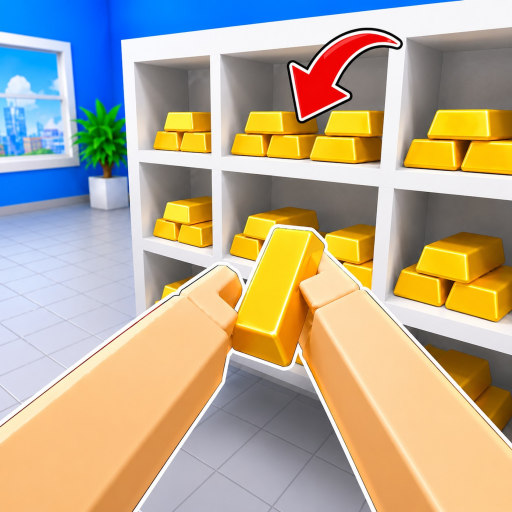
In Clean The Bank!, players interact with thousands of scattered valuables inside Global Union Bank—observed with an in-game HUD counter of 0 / 1,790 items in August 2026 footage. Misplaced items include Gold Bars, Platinum Bars, and Gold Diamonds. Depositing items into matching green glowing 3D silhouettes on storage shelves rewards Cash, which is used to purchase inventory capacity upgrades via the Upgrades menu (Y on controller).

Walkthrough

What to check in-game

Use these notes while you play, then follow the related pages for codes, rankings, tools, or route-specific help.

The 1,790 Item Counter Context

A prominent HUD counter displaying 'Items: 0 / 1,790' was observed during August 2026 gameplay sessions. Official developer descriptions state that the bank contains 'thousands of scattered objects.' Players must note that 1,790 is a version-observed milestone from sampled recordings and may fluctuate in live servers depending on map configurations or game updates.

Observed Item Types and Visual Cues

Sampled gameplay reveals distinct categories of valuables scattered across the floors and desks of Global Union Bank. Confirmed observed items include Gold Bars (destined for Gold Vault racks), Platinum Bars (identified near green shelf silhouettes), and Gold Diamonds. Players use the Inspect key (R on PC or RS on controller) to examine item geometry before transporting them.

Placement Mechanics and Green Silhouette Feedback

Depositing an item requires aligning it with a green glowing 3D silhouette outline on a storage rack. When holding the matching item and pressing E/Click (or RT), the object snaps into place, registering progress on the bank's total item counter and awarding in-game Cash.

Cash Economy and Upgrades Utility

Cash represents the primary in-game currency earned by completing item placements. While full pricing tables and multiplier details are not officially published by NightSync Studio, Cash is spent via the in-game Upgrades interface (Y key on controller or HUD button) to expand inventory slots from base single-item capacity to multi-slot states.

Robux Game Passes (Official API Listing)

The Roblox game-pass API for Universe 10541532285 was checked on September 20, 2026 and returned four NightSync Studio products: Infinite Inventory [OP] at 499 Robux, 2x Items at 149 Robux, Head Start at 39 Robux, and PERMANENT Robot Vacuum, which the API reports as not currently for sale. Those are the creator's own product names and Robux prices, so they can be quoted directly. The API entries carry no description text and the official experience description does not explain effects, so this page does not state what each pass changes in play, how the passes combine, or which of them a player needs. All Robux purchases are handled on Roblox, not on this fan page.

Related help

Connect the topic to player decisions

Wiki pages should point players toward the practical pages that explain what to claim, compare, build, or check next.